
Your timeline, logged.
In seconds, not afternoons.
XML2Excel turns a Premiere Pro sequence export into a formatted, multi-tab Excel workbook — every clip, marker, effect, title, and music cue — and flags the footage that needs a rights check before delivery.
Apple Silicon build — Intel Mac version here. Windows portable (no install) — download here.
Windows users: click "More info" then "Run anyway" on the SmartScreen prompt — the app isn’t code-signed yet, which is expected for a small independent developer.
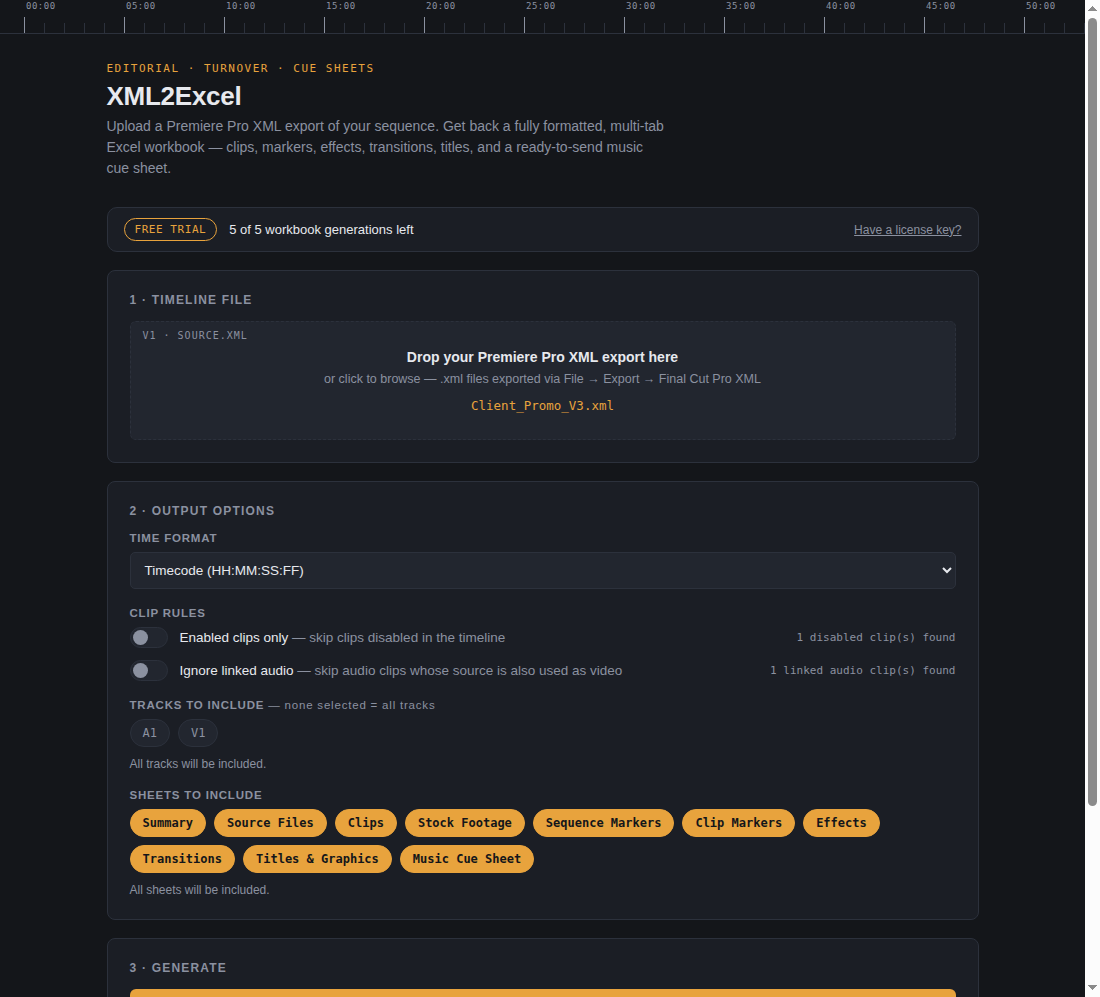
Every final cut ends the same way: someone spends an afternoon scrubbing the timeline, copying clip names into a spreadsheet for the cue sheet, the stock log, and the turnover report. XML2Excel does that job in the time it takes to export an XML.
One XML in. Nine sheets out.
Export your sequence (File → Export → Final Cut Pro XML), drop it on XML2Excel, and get a workbook your coordinator, legal, and post supe can actually use.
Complete clip log
Every video and audio clip with track, source path, frame rate, and start / end / duration in timecode, seconds, or frames — your pick.
Music cue sheet, properly sorted
Music clips are automatically split into three sections — PRO-reportable, royalty-free, and indeterminate licensing — so you know at a glance what actually needs to go to a publisher. Recognizes Universal Production Music’s catalog format and pulls composer, library code, and track number straight from the filename.
Reuse detection
A checkmark next to every clip whose source file appears more than once in the cut — spot repeated b-roll and double-billed licenses instantly.
Granular control
Include all tracks or just the ones you pick. Skip disabled clips. Ignore audio that travels with its video. Toggle any of the nine sheets on or off.
Markers, effects, titles
Sequence markers, clip markers, effects, transitions, and text generators each get their own tab — nothing in the timeline goes unlogged.
100% local
No uploads, no cloud, no account. Your client’s unreleased cut never leaves the machine it’s on.
Catch the clip that shouldn’t ship.
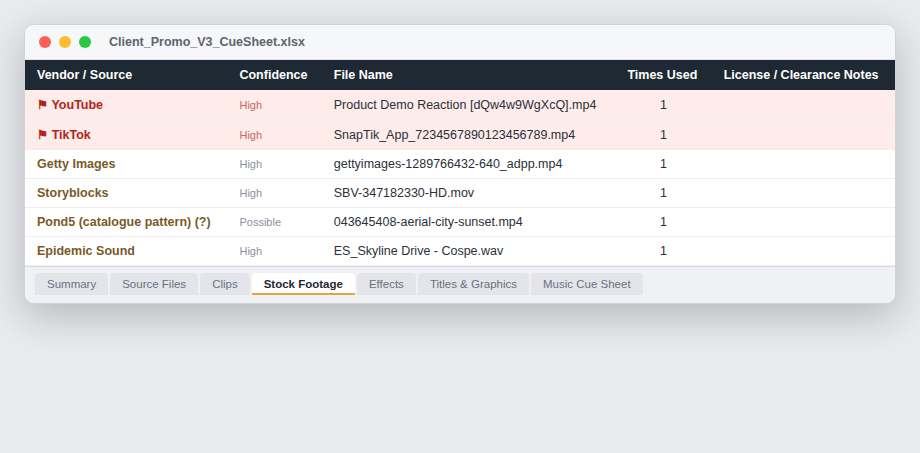
XML2Excel recognizes the naming fingerprints of 20+ stock libraries — Getty, Shutterstock, Adobe Stock, Storyblocks, Pond5, Artlist, Epidemic Sound and more — and builds a dedicated Stock Footage sheet with vendor, confidence, and a clearance-notes column.
And anything that looks ripped from YouTube, TikTok, Instagram, Facebook, or X gets flagged in red on every sheet — so the questionable download a freelancer dropped in at 2am surfaces in your report, not in a claim letter.
Know what actually needs reporting.
Music cue sheets shouldn’t mean guessing which tracks need publisher paperwork. XML2Excel automatically sorts every recognized music clip into three sections: PRO performance-royalty reporting, standard royalty-free license, and indeterminate for vendors whose terms vary by tier.
Recognizes Universal Production Music’s catalog naming convention and pulls composer library, track number, and catalog ID straight from the filename — plus a fix for a real Premiere XML quirk that silently corrupts clip durations on trimmed and archived media.
How it works
No setup, no plugins, no project file access. It reads the same XML Premiere already exports.
Export your sequence
In Premiere Pro: File → Export → Final Cut Pro XML. One click, any sequence.
Drop it on XML2Excel
The app reads your tracks instantly and shows what it found — including how many disabled clips, linked audio clips, and flagged sources are in the cut.
Generate the workbook
Pick your options, click once, and save a formatted .xlsx ready to attach to the turnover email.
Simple pricing
Try the full app free. Pay once if it earns its keep.
- Full app — every feature, no watermarks
- 5 free workbook exports before a license is needed
- License covers up to 3 of your machines
- Signed & notarized macOS app (Apple Silicon + Intel)
- No subscription. No account. No telemetry.
VAT / sales tax handled automatically.
Questions
Which editing apps does it support?
Adobe Premiere Pro’s XML export (Final Cut Pro XML / XMEML format) is fully supported today. DaVinci Resolve and Avid can export compatible XML in many workflows — if your XML doesn’t parse, email us with the file and we’ll make it work.
How does the free trial work?
Download the app and generate up to 5 complete workbooks — full features, real output, no watermark. After that, the app asks for a license key. Loading and previewing sequences is always free.
What happens after I buy?
Checkout takes about a minute; your license key arrives by email immediately. Paste it into the app’s activation screen and you’re done. One key activates up to 3 machines, and you can deactivate a device yourself anytime to move it.
Is my project data uploaded anywhere?
No. Parsing and workbook generation happen entirely on your machine. The app only makes a network request to validate your license key.
Is the stock/social detection guaranteed?
It’s a triage aid, not a licensing database: it flags files whose names or paths match known vendor and platform conventions, and tells you exactly why each one was flagged. A clean report doesn’t guarantee clearance — but it catches what manual scrubbing misses.
Mac or Windows?
Both. macOS (Apple Silicon and Intel) is signed and notarized. Windows is available as an installer or portable exe — it isn’t code-signed yet, so you’ll see a “Windows protected your PC” prompt on first launch; click “More info” then “Run anyway” to continue.
How is this different from StockAudit?
They answer different questions. StockAudit reconciles your stock download log against the final cut, so you license exactly what you used. XML2Excel documents the whole timeline — every clip, marker, title, and music cue — as a turnover binder, and flags likely stock by naming convention. Auditing stock licensing? StockAudit. Full delivery paperwork? XML2Excel. Plenty of editors run both on the same job.